Art Gallery Exhibition

Art Gallery Exhibition
Art Gallery Exhibition
The Art Gallery Exhibition theme provides a structured layout for displaying artwork, image collections, and exhibition details on a website. Its design supports image galleries, text sections, navigation menus, and dedicated pages for organizing visual content. Users can arrange artwork with titles, captions, and descriptions to give visitors information about individual pieces. Customizable colors, typography, and layout settings help maintain a consistent visual presentation across different website sections. Responsive layouts allow content to adapt to various screen sizes.
The Free Art Gallery WordPress Theme includes content areas for presenting collections, featured images, and descriptive text. An Art Studio can use these sections to display creative projects, while an Artist can organize selected works into a portfolio. Gallery pages can include artwork details, image captions, and related information. Website owners can customize available design settings to align the layout with their content. Navigation menus help visitors explore pages, and responsive formatting supports browsing on desktop computers, tablets, and mobile devices. The theme provides a practical structure for organizing visual material and exhibition information.
Get 60+ WordPress Themes In One Package WordPress Theme Bundle
View full details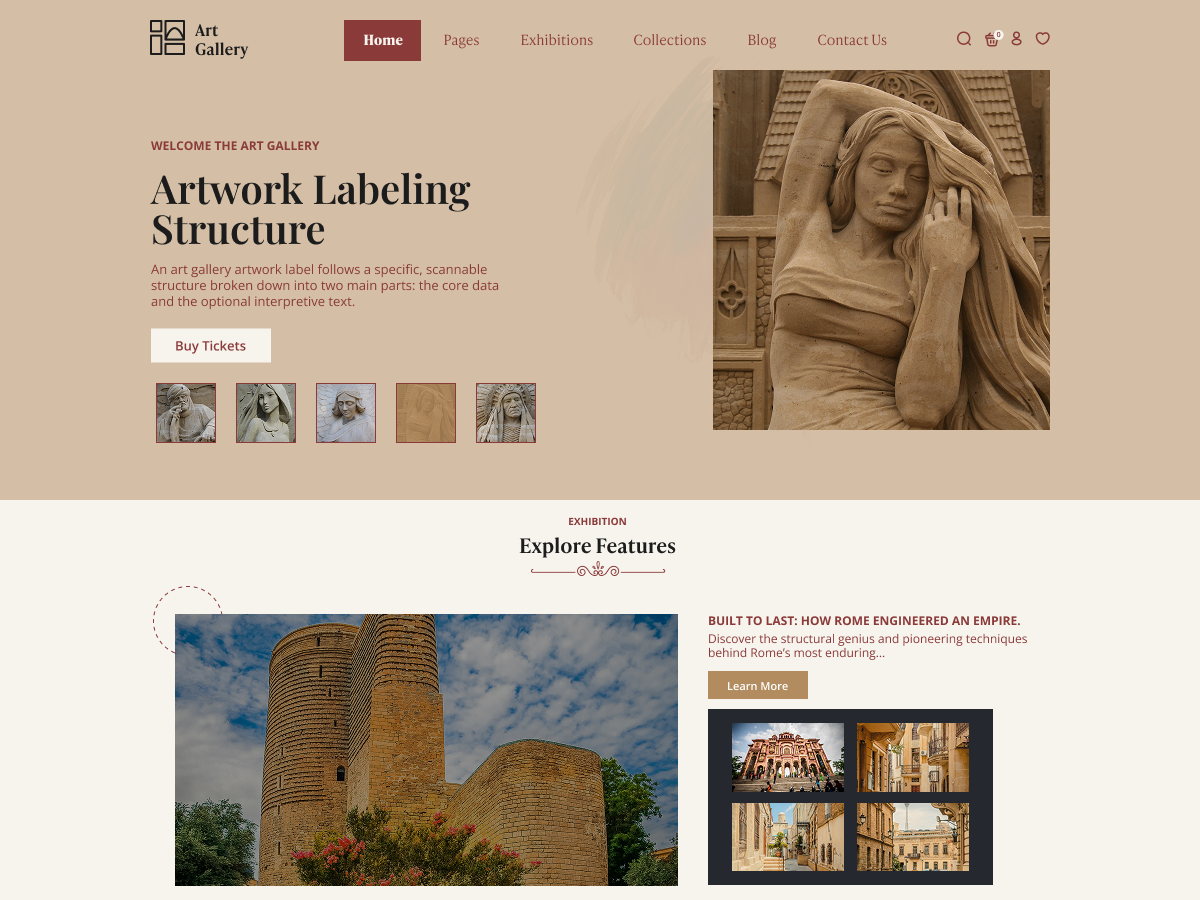
Discription
The Free Art Gallery WordPress Theme supports the presentation of visual collections through organized page layouts and image-focused sections. A Contemporary Artist can use portfolio pages to arrange work by project or artistic style, while a Digital Artist can display illustrations and digital compositions. A Fine Artist may include descriptions, titles, and background information alongside individual pieces. Websites featuring an Art Exhibition can present event details and selected works in separate sections. An Art Museum can organize collection information across multiple pages, and a Photography Studio can use gallery layouts to arrange photographs with captions. These options help structure visual content for visitors.
Key Features of the Free Art Gallery WordPress Theme
- Responsive Layout: The theme uses a layout that adjusts to different screen sizes. Visitors can browse artwork and read page content on desktops, tablets, and mobile devices.
- Image Gallery Sections: Gallery sections help arrange artwork and photographs into organized visual collections. Website owners can group images according to projects, collections, or exhibition categories.
- Customizable Homepage: The homepage can present selected images, introductory text, and links to other pages. Available layout settings help users organize these elements according to their content requirements.
- Customization Options: Design settings allow users to adjust available colors, typography, and other visual elements. These controls help maintain a consistent appearance across the website.
- Artwork Portfolio Pages: Dedicated pages can display individual artworks or collections with supporting information. An Artist can organize projects and provide descriptions to give visitors additional context.
- Navigation Menus: Navigation menus provide links to important website sections. A clear menu structure helps visitors move between gallery pages, portfolios, event details, and contact information.
- Featured Images: Featured images allow selected artwork or photographs to appear prominently in supported sections. Users can choose images that represent a collection or introduce a specific page.
- Content Organization: Separate pages and content sections help divide information into manageable groups. An Art Museum can use this structure to present collections, background details, and related resources independently.
- Typography Controls: Typography settings help establish readable text styles for headings and descriptions. Consistent font choices can distinguish page titles, artwork captions, and supporting information.
- Exhibition Information Sections: Content areas can display exhibition dates, descriptions, and related announcements. Organizers can use these sections to provide visitors with essential event information.
- Image Captions and Descriptions: Text fields associated with images can provide titles, captions, and contextual details. These descriptions help visitors understand the subject or background of displayed artwork.
- Contact Page Support: A dedicated contact page can display contact details and other relevant information. A Photography Studio can use this page to explain its services and provide visitors with a way to make inquiries.
Portfolio and exhibition pages help present visual work alongside relevant written details. An Art Exhibition can include event dates, introductory text, selected images, and information about featured pieces. A Digital Artist may organize digital illustrations by project, while a Fine Artist can provide titles and descriptions for individual works. An Art Museum can use separate pages to distinguish collections or provide background information about displayed objects. Image captions and descriptive text give visitors additional context, especially when a gallery contains work from different periods or projects. Website owners should use clear page titles, descriptive image text, and consistent navigation. These practices help visitors understand the structure of the website and find relevant information efficiently.
Themes Bundle! Get all themes for just $99
WordPress Theme Bundle – Get 60+ WordPress Themes In One Package